Driving
The Driving section covers what happens between charges: individual trips, efficiency vs temperature, and regen recovery.
It has two pages under the sidebar's DRIVING group:
- Trip Sessions at
/driving/sessions— full trip list and detail drawer - Analytics at
/driving/performance— efficiency correlations and regen trends
Renamed from Trips
In earlier releases this lived at /trips. v0.3 moved it under /driving/* so it sits alongside /charging/*. The trip data and detail views stayed the same; only the URL and sidebar grouping changed.
Trip Sessions (/driving/sessions)
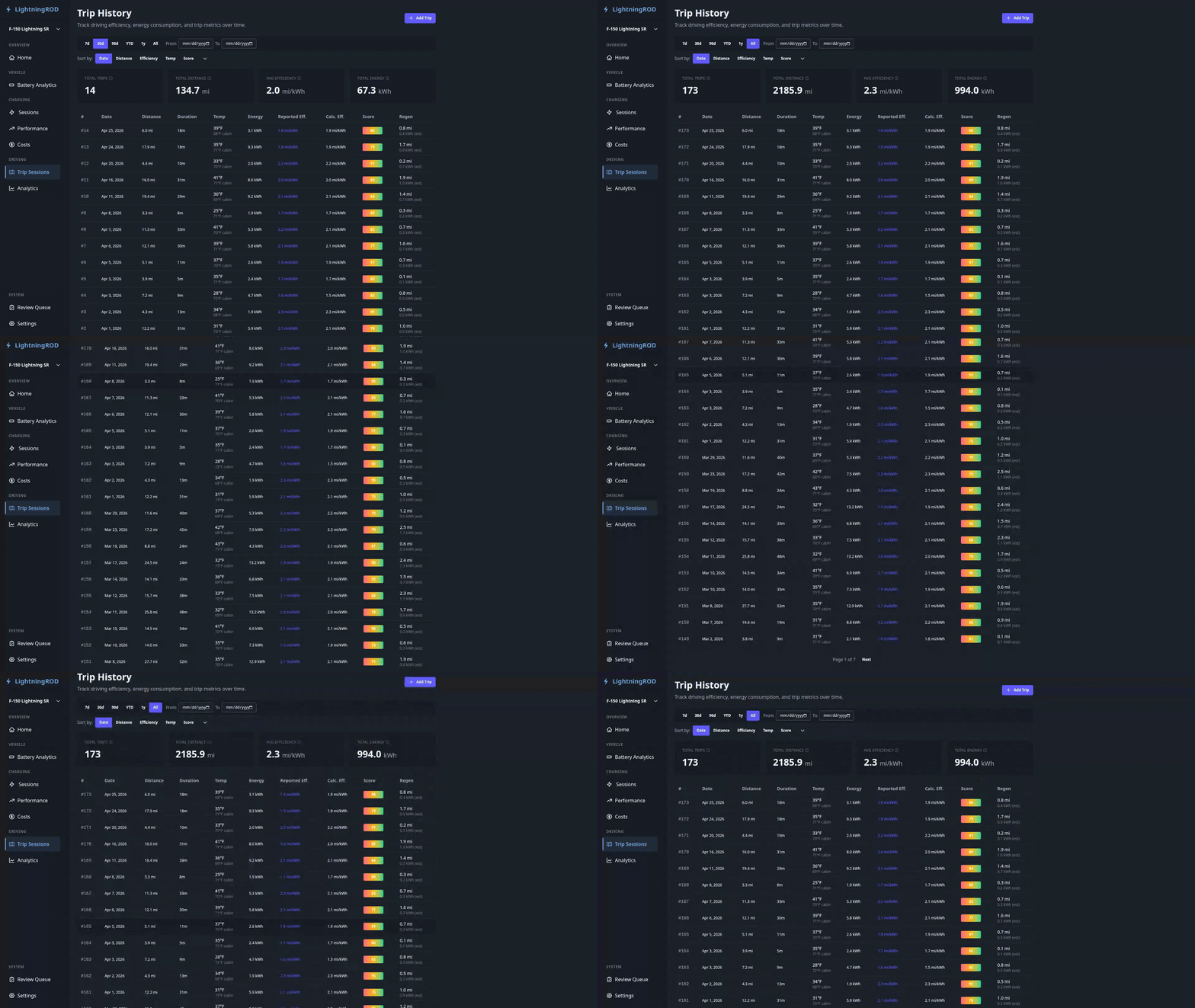
A paginated table of trips with nine columns: number, date, distance, duration, temperature, energy used, efficiency, driving score, and regeneration.
Where efficiency comes from
Efficiency is calculated by LightningROD as distance / energy from the trip data. The vehicle's dash may show a lower number for the same trip because its own figure includes climate and accessory energy, while the API's energy_consumed covers propulsion only. No independent vehicle-reported efficiency is available through Home Assistant today.
Click any row to open a slide-out detail drawer with:
- Overview -- start/end location, distance, duration, energy, temperature
- Driving scores — smooth/efficient/safe score breakdown
- Environment chart — temperature and altitude over the trip
- Drive graphs — SOC, speed, and range on a shared time axis (interpolated segments shown as dotted lines at 40% opacity)
- Expand — a full-screen modal with Battery, Environment, and Driving chart sections
- Delete Trip — removes the trip after a confirmation prompt
Summary cards above the table - Total Trips, Avg Efficiency, Total Distance, Total Energy - respect the date range filter.
Driving Performance (/driving/performance)
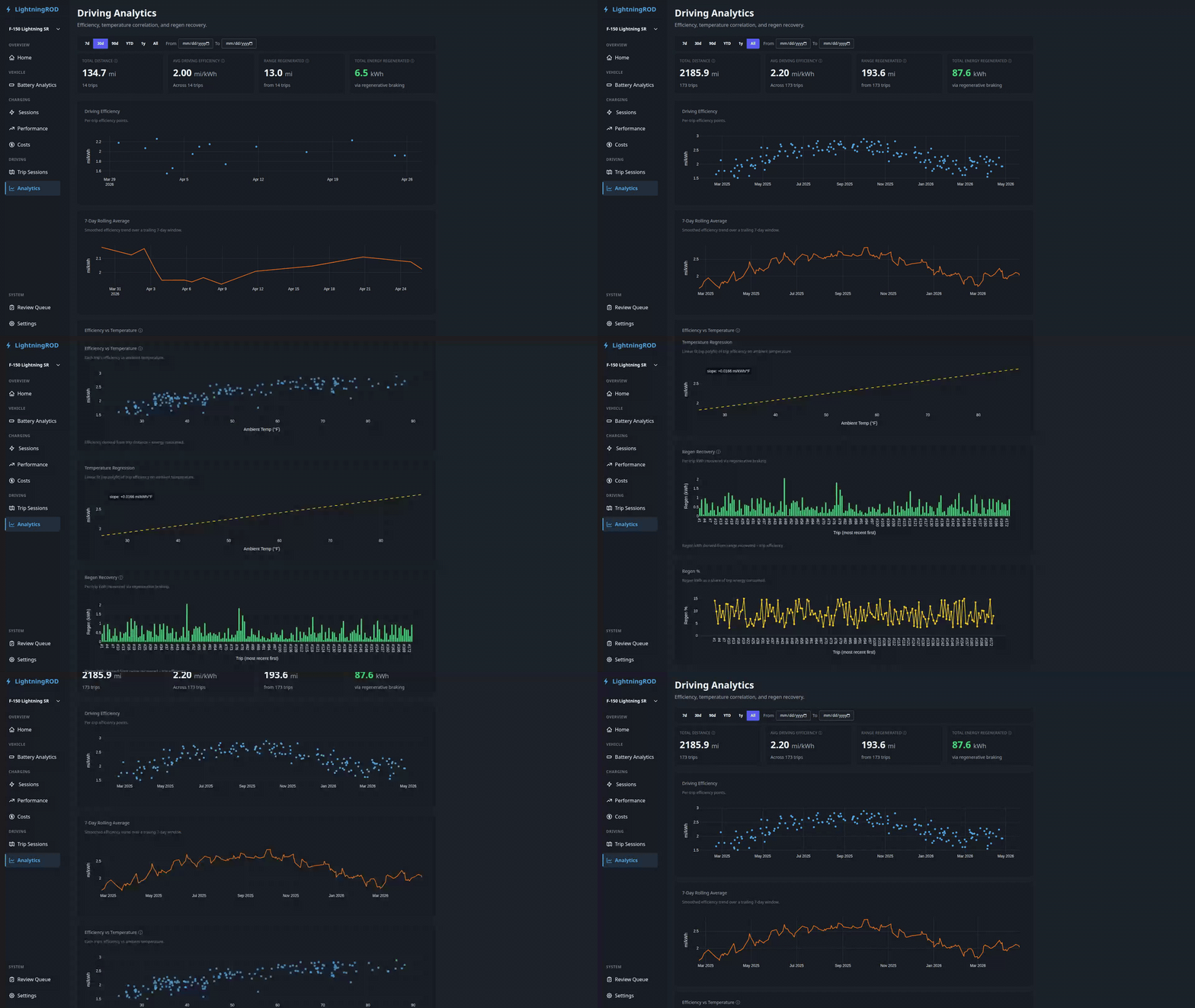
A driving-side analytics page introduced in v0.3.
Summary Row
- Range Recovered (Regen) -- total regen across trips in range
- Plus per-page summary tiles for total distance, average efficiency, and more
Driving Efficiency Trend
A time-series chart of mi/kWh per trip (or km/kWh in metric). It mirrors the Charging Efficiency trend on /charging/performance.
Efficiency vs Temperature
A scatter plot of individual trip efficiency against ambient temperature, with a fitted trendline. Useful for spotting cold-weather efficiency loss.
- X-axis: ambient temperature (°F or °C per unit preference)
- Y-axis: calculated mi/kWh or km/kWh
- Trendline: least-squares linear fit, shown only when enough trips have ambient temperature data
Regen Recovery
A dual-axis bar and line chart showing regen per trip:
- Bars: regen kWh per trip
- Line: regen percentage per trip
- Most recent trips first, scoped to the current date range
Hover any bar for trip date, regen kWh, regen %, and distance.
Date Range Filter
Both pages use the same filter bar as the other analytics pages: ?range= presets (7d / 30d / 90d / YTD / 1y / All) or a custom From/To date pair.