LightningROD
Self-hosted charging analytics for Ford electric vehicles.
Track charging sessions, analyze costs, and monitor energy consumption with a web-based dashboard.
Built for the Ford F-150 Lightning, designed to work with other Ford EV's using data from ha-fordpass or CSV imports.
AI Disclaimer
AI (primarily Claude) was used.
See the AI Usage Disclaimer for how, why, and more information.
Why So Many Data Fields?
LightningROD stores a lot of fields on purpose. Charging analytics becomes much more useful when raw and derived data are both available.
- Different calculations need different inputs -- costs, EVSE loss/utilization, comparisons, and trend charts each rely on different fields.
- Data quality varies by source -- Home Assistant, CSV files, and manual entry all provide different levels of detail, so fields are optional and can be filled incrementally.
- Recalculation needs history -- when rates, subscriptions, networks, or mappings change, stored detail allows recalculating without losing fidelity.
- Auditability matters -- keeping source-oriented fields makes it easier to trace where numbers came from (manual, import, HASS, stall defaults, estimated).
In short: more fields means better calculations, safer backfills, and fewer assumptions.
Features
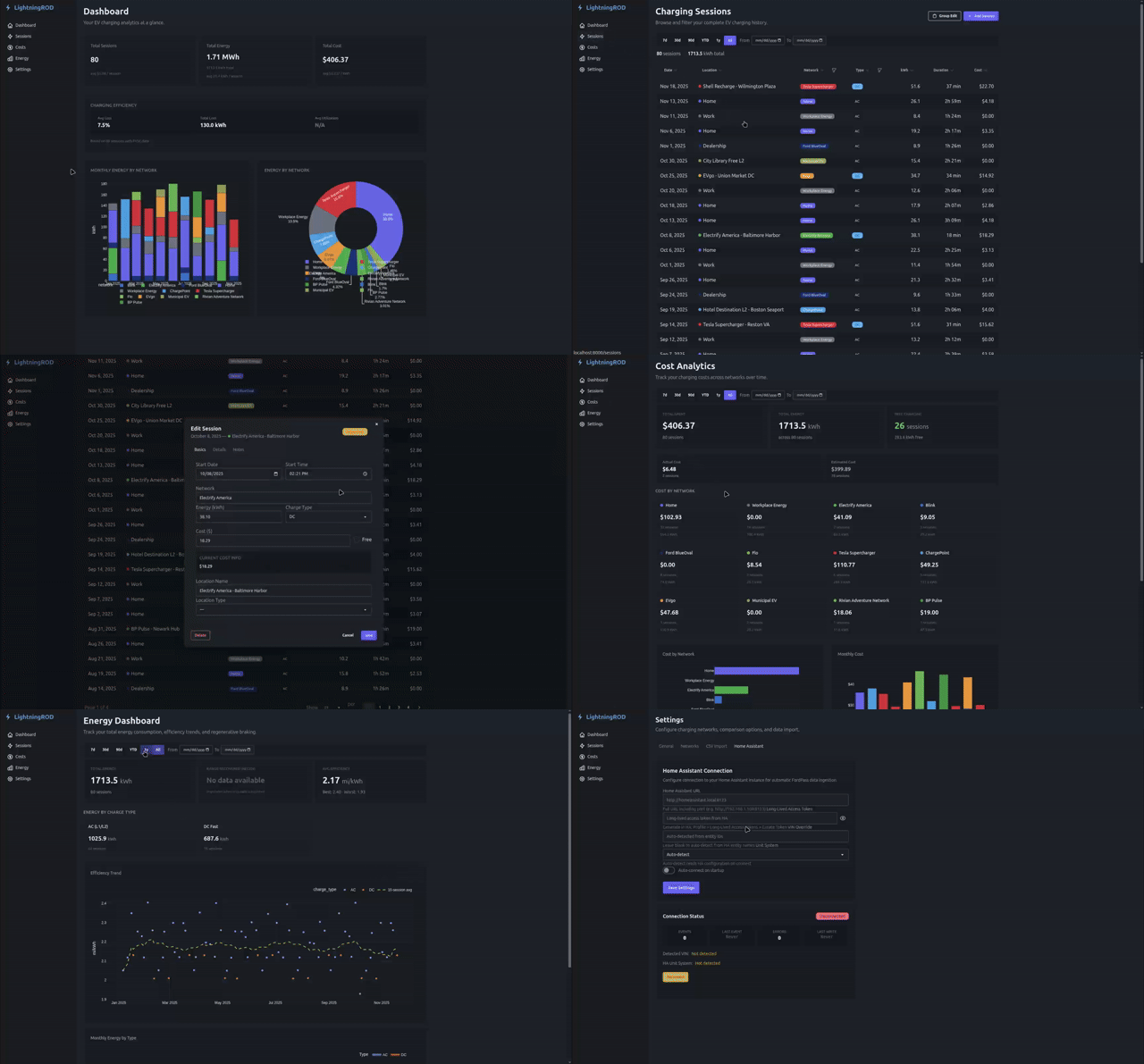
Home Dashboard -- Multi-vehicle overview, global summary cards, EVSE charging-efficiency aggregates, monthly energy by network chart, and network energy breakdown.
Charging Sessions -- Full CRUD with sorting, date presets, charge-type and network filters, group edit, and a detail drawer with cost breakdown, EVSE metrics, stall context, and charge-curve preview.
Charging Performance -- AC vs DC energy donut, charging efficiency trend with rolling average, monthly energy by charge type, and a synthetic DC charge curve for when real telemetry is missing. (Renamed from "Energy" in v0.3.)
Cost Analytics -- Cost hierarchy (manual/imported, location override, network, subscription member rate), actual vs estimated tracking, subscription savings, and gas/network comparison scenarios.
Battery Analytics -- SOC timeline with color-coded charging regions, an HV Pack Telemetry card (temp / voltage / amperage / power with 7-day sparklines), industry-standard flipped charge curves (SOC% X, kW Y) with reference/average/session overlay, a battery temperature over time chart, and mileage-based degradation scatter.
Driving -- Trip Sessions table with 10-column detail view + slide-out drive graphs, plus a Driving Performance analytics page covering mi/kWh vs ambient temperature correlation, regen recovery per trip, and driving efficiency trend. (New in v0.3.)
Network & Location Management -- Color-coded networks, expandable location management, per-location cost overrides, charger stall definitions (with template pre-fill), and subscription period management.
Review Queue -- Verify, edit, merge, and clean up auto-detected networks and locations from Pending and Approved tabs. Promote a one-off location into its own network in a single click.
CSV Import -- Template download plus auto-detection fallback, timezone-aware parsing, inline row correction for errors/duplicates, and support for full session/EVSE field mapping.
Home Assistant Integration -- Real-time WebSocket connection for automatic charging session detection from ha-fordpass. Vehicle telemetry ingestion, VIN auto-detection, home-zone location auto-populate, unit normalization, and full-history backfill (no 30-day cap).
Settings -- Vehicle profiles with cascading Make/Model/Trim presets, a dedicated Fuel tab for multiple ICE vehicles and gas price history, a Data Sources tab for Home Assistant adapter configuration, split distance/temperature unit preferences, timezone selection, and comparison display toggles.
Quick Start
git clone https://github.com/SquidBytes/LightningROD.git
cd LightningROD
cp .env.example .env
docker compose up -d
The app will be available at http://localhost:8000. See Installation for full details.
Tech Stack
| Layer | Technology |
|---|---|
| Language | Python 3.11 |
| Web framework | FastAPI |
| Database | PostgreSQL 16 or SQLite |
| ORM | SQLAlchemy 2.0 (async) |
| Migrations | Alembic |
| Templates | Jinja2 |
| Frontend | HTMX 2.0, Tailwind CSS v4, DaisyUI v5, Plotly |
| Deployment | Docker Compose |
| Docs | Zensical |